 Click to view the Preferences page
The Preferences page is where you define several system settings. The settings that you can change on this page will only pertain to you and will not affect the way data is presented to other users in your organization.
Click to view the Preferences page
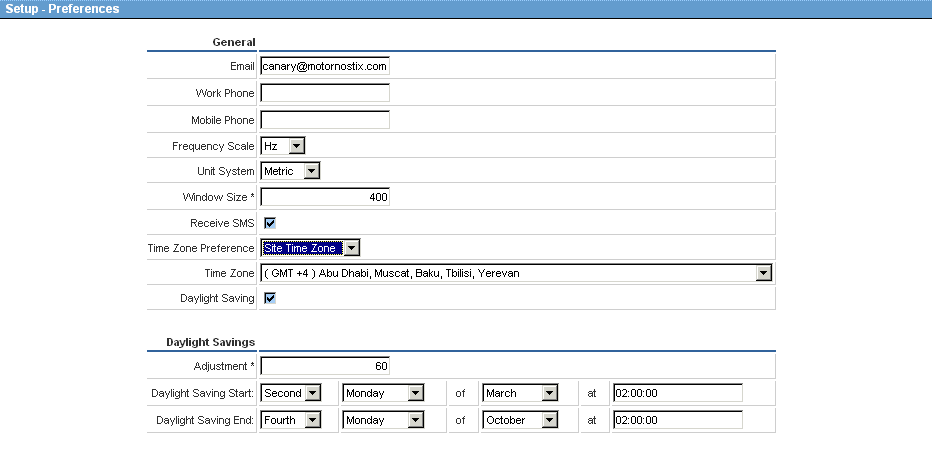
Enter the e-mail address you want Motornostix to use to contact you. If you are an alarm receiver, this is the address to which system alarms will be sent.
Enter the phone number where Motornostix staff can contact you during office hours. Please include any international and regional prefixes.
Enter the mobile phone number. Numbers only in the following order: International code, area code followed by the number in digits without any leading zeroes.
Toggles frequency view between CPM an Hertz—this does not affect your other system units.
Toggles system unit display between Metric and Imperial.
Window size is a value that determines the cut-off frequency of the high pass filter used to remove DC. A bigger window size corresponds with a lower cut-off frequency.
Specifies that alarm notification must be sent to you in SMS as well as the default e-mail format—this is only applicable if you are an alarm receiver.
If you are in a different time zone from your site and you want all system times to be corrected for your time zone, select User Time Zone and select your Time Zone from the list below. This enables you to discuss specific diagnostic events with users who are not in your time zone.
Select this option if your region uses daylight saving.